
Microsoft Defender Exclusion Check Error
在打开 Eclipse 时,可能会遇到 Microsoft Defender Exclusion Check 功能检测不到 Microsoft Defender 状态的错误弹窗,如下图所示:
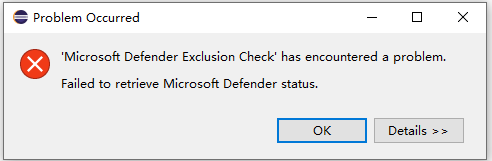
上述错误可能与使用的 Windows 版本配置有关,按照下列设置方法可阻止弹窗:
-
在菜单栏中,选择 :
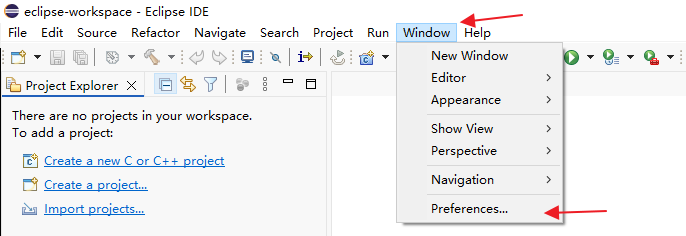
图 1. Preferences -
在弹出的 Preferences 配置窗口中,打开 配置页,并勾选 Skip exclusion check on startup for all new Eclipse-based installations 选项:
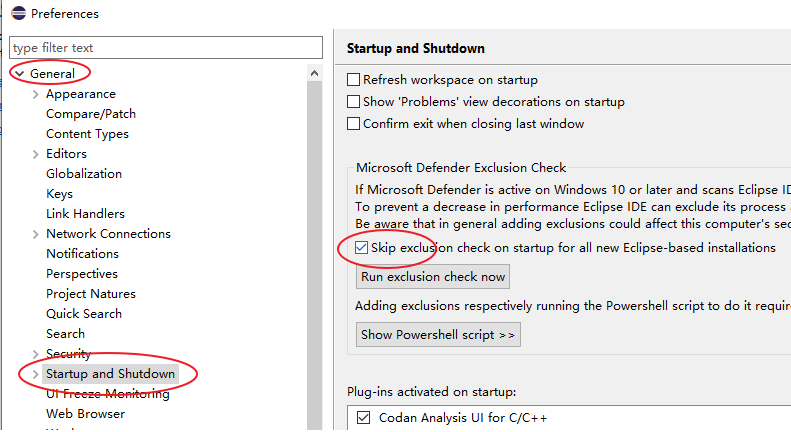
图 2. Startup and Shutdown 配置